
Resilience Design Lab
Designing a scalable research website the lab could maintain independently

0 → 1
No digital presence → Built a centralized digital hub
Project Outcome
Publish Once
Manual content organization → Publish once, and the system places content automatically
Paper → Digital Hub
Individual physical papers → A structured, browsable online research collection
Overview
Context
The Resilience Design Lab produces research, client projects, and ongoing updates across multiple areas of organizational resilience. As its body of work grew, the lab needed a centralized digital platform that could make this content easier to access and continue evolving over time.
Challenge
The challenge was not simply putting research online. The digital structure also had to make a growing body of work easy for visitors to understand and explore, while remaining simple enough for the lab to maintain without ongoing designer support.
How might we turn the lab’s growing research collection into a discoverable, scalable digital platform that visitors can navigate easily and the team can maintain independently?
Why This Mattered
No Digital Home
The lab lacked a centralized digital presence to present its research, projects, and ongoing work in one credible place.
Limited Discoverability
As content grew, visitors needed a clearer way to browse the lab’s work and find relevant research.
High Publishing Overhead
Without reusable structures, every new update risked requiring repeated layout and content decisions.
Solution Summary
Designing for both discovery and publishing
I designed and built the lab’s first centralized research website from the ground up, creating a clear structure for Projects, Research, and Blog content while making the lab’s growing body of work easier for visitors to browse and discover.
Behind the interface, I created a reusable publishing system that allowed the lab to add new content within consistent layouts and maintain the site independently after handoff. The result was a scalable digital home that improved research access without increasing ongoing maintenance work.
02. Existing publishing workflow

Discovery
Before designing the interface, I looked at what the lab needed to publish, how visitors would find that content, and how the team would maintain the website after handoff.
01. Content & user ecosystem

03. Design constraints
Timeboxed Core Build
8-week initial design + implementation
Lean Budget
Prioritize clarity, efficiency, and low-maintenance solutions
Client Handoff
Independent maintenance required
Key Insights
Insight 01
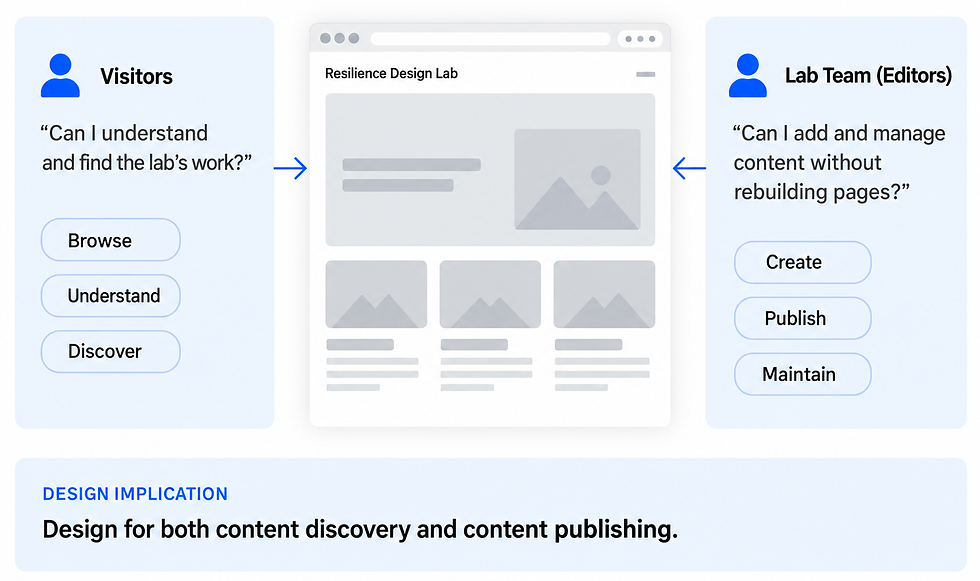
The website had two users: visitors and editors.
The platform needed to support two different experiences: helping visitors explore and understand the lab’s work, while enabling the lab team to publish and manage content independently.
Insight 02
Growing research needed a content system, not more pages.
As the lab’s body of work grew, adding content page by page would make the site harder to navigate and maintain. The platform needed a structured system that could organize new research, projects, and updates consistently as it expanded.

Insight 03
Maintainability meant reducing repeated decisions.
Publishing new content should not require the team to rethink layout, formatting, and placement every time. Reducing these repeated decisions was key to making the site easier to maintain and less dependent on ongoing design support.

Solution
01. Clear content architecture
Organizing the lab’s work into a clear content structure
I organized the platform around clear content types for Research, Projects, and Blog updates, giving each type a consistent place in the site hierarchy and making the overall structure easier to understand.

02. Research discovery
Making research easier to browse and discover
I designed browsable research listings and consistent content cards so visitors could scan the lab’s work, understand what each piece was about, and move between related content more easily.
Categories and tags added another layer of structure without requiring visitors to know exactly what they were looking for.

03. Reusable interface patterns
Designing reusable patterns for consistent growth
To support long-term growth, I designed reusable interface patterns for the lab’s key content types. New research, projects, and updates could be added within a consistent structure without redesigning layouts each time.

These interface decisions were supported by a publishing system that automated how new content was structured and surfaced across the site.
Building a system behind the interface
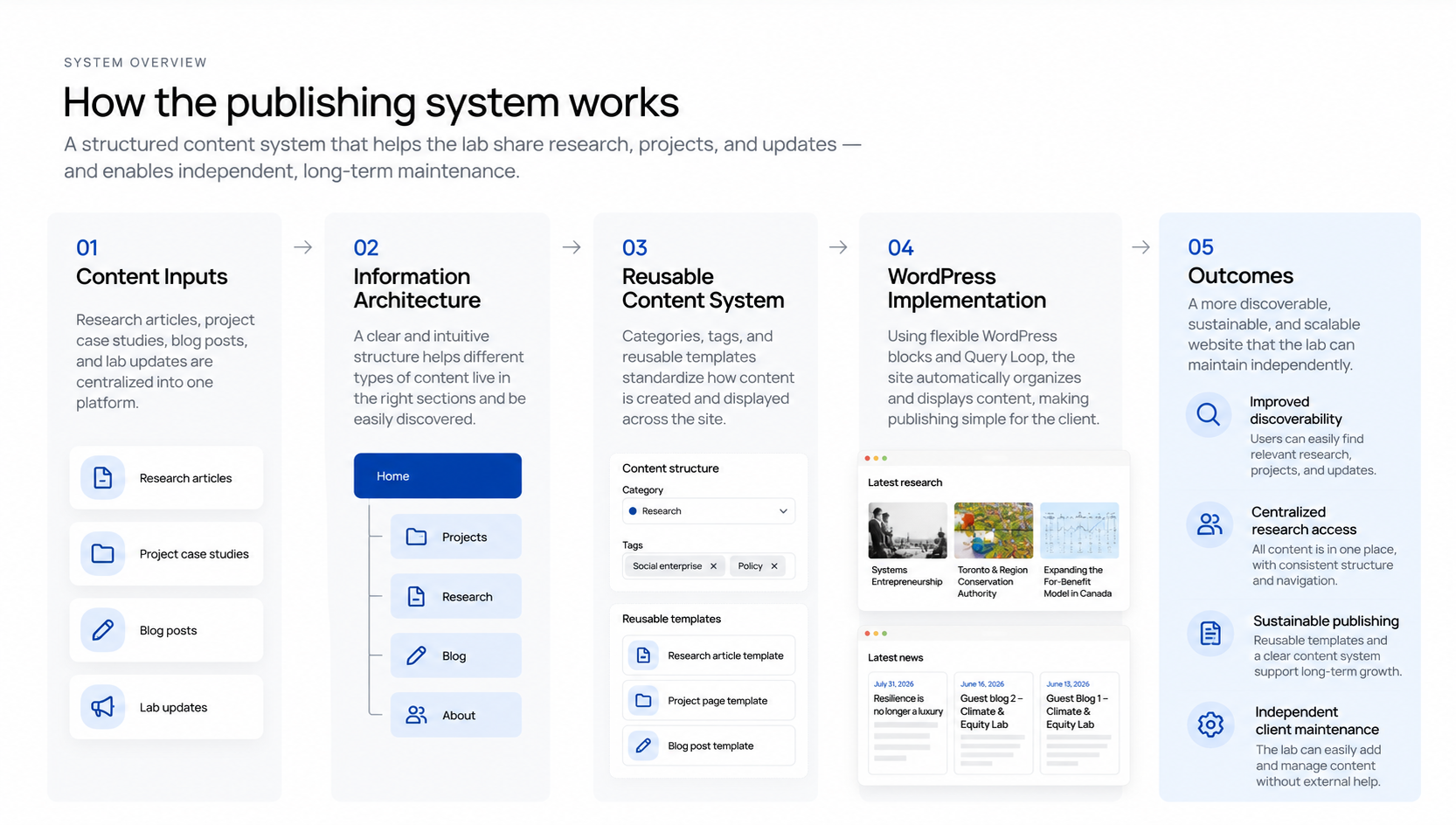
The interface was supported by a structured publishing system that defined how content was created, organized, and surfaced across the site. The goal was to let the lab publish new work without manually rebuilding pages or updating listings.
02. Taxonomy & Automation
Using metadata to organize content automatically
Categories and tags gave each piece of content metadata that could determine where it appeared across the site. This created a scalable way to organize growing research without manually maintaining every listing page.

WordPress Query Loops used this metadata to automatically populate content listings.
01. Structured Content Model
Giving each content type a clear structure
I separated the lab’s growing content into distinct types for Research, Projects, and Blog updates. Each type followed its own consistent structure while sharing the same overall navigation and visual system.
Research
Categories · Tags · Research content
Projects
Project information · Context · Process · Outcomes
Blog
Date · Title · Summary · Update content
03. Publish Once, Surface Automatically
Turning publishing into a repeatable workflow
Instead of manually adding new content to multiple pages, the editor only needed to create the content, assign the relevant metadata, and publish. The system handled the recurring layout and listing updates automatically.

System Design
Handoff
Designing for independence after launch
The handoff focused on making the system understandable and manageable for the lab without ongoing design support. I walked the client through the recurring tasks they would handle themselves, including adding new research, projects, and updates, assigning categories and tags, and maintaining existing content.
What the client could manage

One Month After Handoff
“The structure and publishing workflow were straightforward to maintain.”
The handoff validated that maintainability was not just a design intention, but something the client could sustain in practice.
Reflection
Designing beyond the launch
This project changed how I think about maintainability in digital products. A clear interface was only part of the solution; the content structure, publishing workflow, and decisions the client would need to make after handoff were equally important.
Designing for both visitors and editors pushed me to think beyond individual pages and toward a system that could grow over time. The most valuable outcome was not simply launching the lab’s first digital home, but creating a structure the team could continue using independently.
What I would explore next:
If I continued the project, I would validate the information architecture with more external visitors and use site analytics to understand how people move between research, projects, and related topics. This would help refine the taxonomy as the lab’s content continues to grow.
Other Featured Projects:

One Iota: Golf Performance Tracking

AquaQuest: Gamified Aquarium Journey

DDW Music Festival: Interactive Festival Microsite

Community Exhibition: Seasonal Community Curation Program